The wiki in the game
The game links to this wiki in two places. The Wiki button opens the front page. Look up turns an item, monster or NPC on your screen into its page. A third tool, /ask, is coming soon. Global Chat is described under Command Window.
Quick facts
| Tool | Cost | Status |
|---|---|---|
| Wiki | Free | Live |
| Look up | Free | Live |
/ask |
10,000 zen | Coming soon |
Wiki button
- Press D to open the Command Window.
- On the Player tab, click Wiki.
The wiki opens in your browser at its front page. The link is also printed in blue in the chat, so you can copy it if the browser does not open.
Look up
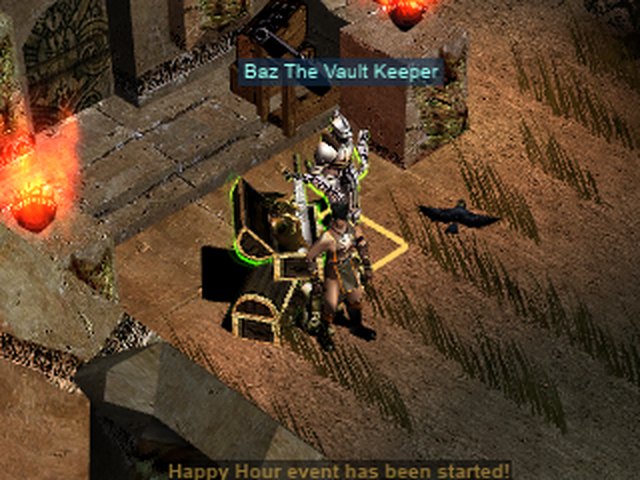
Look up opens the page of whatever you click in the world.
- In the Command Window, click Look up. It sits beside the Wiki button. The pointer becomes an eye, and the chat says "Click an item, monster or NPC to look it up in the wiki."
- Move the pointer over the world. A square lies on the floor under the pointer and follows it.
- Click the thing you want. Its page opens in your browser.
On a phone, the page opens in the phone's browser.
The square
| Colour | Meaning |
|---|---|
| Dim white | An empty tile. A click does nothing. |
| Gold | A monster, an NPC or an item on the ground that has a page. Its name is shown above it. |
| Grey | Something with no page, such as a player or an item from a later season. The label reads "no wiki page". |
A monster or NPC with a page gets the game's usual outline and name box. An item on the ground glows.
What you can look up
- An item in your bag. Its cells are outlined when it has a page.
- An item on the ground.
- A monster.
- An NPC.
Stopping
A click on an empty tile does nothing, and Look up stays on. Press Esc or right-click to stop it.
/ask
/ask is marked coming soon. It is not live yet, and the details may change.
- Type
/askand a question, for example/ask where is Jewel of Bless. - The answer comes from this wiki, in your own language, as a few short blue lines of chat. The last line links to the page.
- A question costs 10,000 zen, taken when you ask.
- You can ask once every 30 seconds.
- You get the zen back if no answer comes, which happens when the answer takes longer than 20 seconds or the wiki's daily question limit, shared by all players, has been reached.